One of the things I miss from Microsoft is the access to Github Copilot CLI with nigh-unlimited token usage. I looked for cost-effective ways for LLM access that can augment any paid or local LLMs I have. That’s how I discovered an Open Source project, OmniRoute (GitHub).
So, what’s OmniRoute?

With OmniRoute, you can leverage multiple LLM providers with your favorite CLI or harness (like Claude Code, Codex, or Continue.dev). This is what happens:
- OmniRoute exposes a
localhost:20128endpoint with a dashboard so you can configure which providers to leverage, like OpenAI, Claude, or Chipotle (not kidding). You specify the priority of the LLMs - you can mix paid and free providers. There are 236 available as of this date. localhostalso serves an OpenAI-compatible API that a harness can hit.- Configure your favorite harness to route requests to your
localhost. I was chagrined to see that GitHub Copilot (CLI and in VSCode) does not allow you to switch endpoints that I could see. - Each request sends a model parameter to use. Instead of using a well-known model name (e.g.
gpt-5.6-sol), the client sends up a “model” (aka “combo”) that only OmniRoute knows (likeauto/best-coding). Use one that’s built-in to OmniRoute, or you can add your own.- OmniRoute suggests starting with the
autocombo. - OmniRoute will try all providers associated with a combo for your prompts, with smart caching of what works.
- You can provide API keys for paid models if you want to use them in your combo.
- OmniRoute suggests starting with the
OmniRoute embodies this insightful principle:
Every computer science problem can be solved by just another layer of abstraction.
 -- David Wheeler
As a developer working with an agent, you can choose which models you want on the fly. For your specific configuration, you can pick and choose from multiple paid and free models out there. This extra layer of abstraction allows OmniRoute to support:
- Smart failure modes - if you hit a 429 or timeout in the middle of a chat, you won’t lose context.
- RTK + Caveman compression to optimize your model usage.
- Not to mention, you can use the same harness/CLI, and select which backend you want to hit by switching your model/combo.
- For example, I’m OK with using the cloud-based services for most queries, but I want to hit my local LLM to do my taxes.
And since the code is open source, you as a developer can make changes to decorate any requests to fulfill your specific needs.
OK, how do I get it working with Codex?
One of the problems I had to work through when I first started using OmniRoute is “how do I get started”? Below is a quickstart for users. I’ll start with Codex for a CLI, and Continue.dev for VSCode integration.
- Install OmniRoute with
npm install -g omniroute. - Run
omniroute, this will open up the dashboard. Default password isCHANGEME. - From the left sidebar, click on “API Keys” and create a new API key. Record it separately since it will not be visible again.
- In your operating system, set the environment variable persistently. e.g., in Windows:
setx OMNIROUTE_API_KEY <APIKEY> - Now let’s launch Codex, but configured for OmniRoute. Do:
omniroute launch-codex --model autoYou can do this manually via
codexand command line parameters to specify endpoint and api key, but with the above command, OmniRoute takes care of everything for you. - (optional) You can see the details of the request by clicking Monitoring/Logs from the left sidebar:
 Clicking through shows you more details. As a side note, you can see what info gets sent up from your favorite harness. This is helpful from an educational and debugging perspective.
But I like IDEs!
I couldn’t figure out a way to get VSCode’s native GitHub chat to point to a different endpoint. I ended up downloading the Continue.dev extension and used that instead. OmniRoute doesn’t auto-configure this for you, so it’s a little bit involved.
First, go through steps 1-3 above. Then:
- In
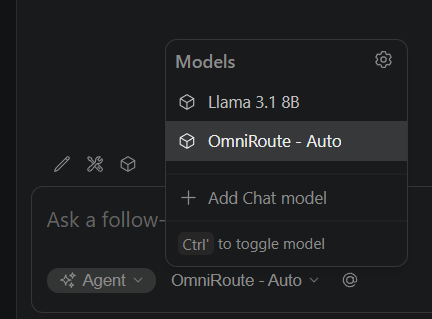
%USERPROFILE%\.continue\config.yamlor~/.continue/config.yaml, find themodelsdata structure. Add the following lines to add theautomodel config, and replacewith the api key you generated above. - name: OmniRoute - Auto provider: openai model: auto apiBase: http://localhost:20128/v1 apiKey: <APIKEY> - In the Continue.dev chat pane, select
OmniRoute - Autoand you will make requests to OmniRoute. - (Optional) Exercise for the reader - have your IDE update the
config.yamlwith all the other prebuilt configurations 😊
Tradeoffs
Like everything in engineering, there are tradeoffs. When you’re working with free models, you need to deal with higher latency and availability. For me, I’m not currently working on huge code bases (like Microsoft Teams or Loop), so the tradeoffs swing the right way for me.
Closing thoughts
That should get you started! Hopefully this gives you enough info so you can pattern match to other harnesses. OmniRoute is Open Source, and they welcome contributions if you find any issues or if you have any suggestions!
]]>