Taking a break from MAPI articles.
Hi everyone, I’d like to move away from Messaging for a bit, and talk a little bit about a project that came to fruition. It was codenamed “Neo” and dogfooded internally, but it’s now available to the public!
Just a Shadow of the old homescreen left.
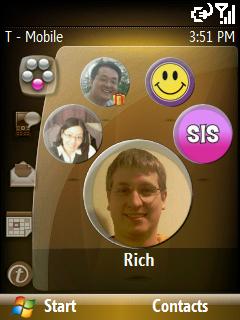
By now, some of you might have heard of the T-Mobile Shadow. The Shadow is a cool-looking device, with a 20 key slide-out keypad, circular scroll wheel, and large screen! But when you boot up for the first time, you may wonder, “Is this really Windows Mobile?”
The answer is YES! :)
With this phone you get a friendly homescreen experience and integration with your T-Mobile MyFaves service. For those who don’t know, the MyFaves service from T-Mobile allows you to make unlimited calls to five designated people. From the homescreen, you can make changes to your five favorites and get information about them. You missed a call or text message, and if there’s an upcoming anniversary or birthday (in the accompanying image, notice the little birthday gift next to the upper left MyFave).
Also, it’s not possible to see from the still image, but there’s a smooth animation when one hits left or right on the D-pad, or rotates around on the wheel.
Hardware and Software hand-in-hand
Normally when Windows Mobile creates a release, we release it out to OEMs who then do their own customizations. With AKU 0.5, however, Microsoft worked with the OEM to create an experience that catered to what T-Mobile wanted. The OEM had their talented industrial design team working on the hardware form-factor and wheel. Microsoft wrote the homescreen and worked out an interface for the MyFaves information to bubble up to the homescreen. Finally, we presented various UI asset and hardware combinations to T-Mobile to finalize the design.
“Cuddlier”?
Yup, that’s one adjective used by one reviewer.
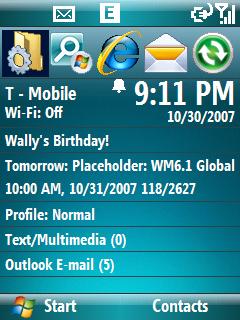
What’s different about Neo compared to Microsoft-shipped homescreens is the liberal use of the QVGA screen for images ☺. Picture the Windows default home screen shipped with every Windows Mobile Standard device. It shows as much information on the screen as possible to minimize scrolling. This is great for a user who wants to view things on the go without touching the device.
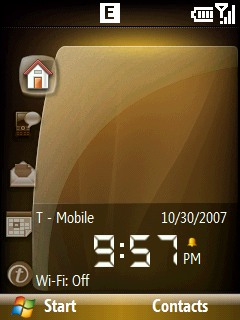
The default homescreen puts as many plugins on the screen at once, but Neo does the opposite - each plugin occupies one full page. When you navigate up and down, the whole screen animates to the newly-activated plugin. In addition, there is a navigation bar on the left so you can tell which plugin you’re at.
As for the plugins themselves, we ship with eight of them:
- MyFaves/Clock (it displays your five Faves when you have a supported SIM, otherwise it displays a clock)
- Notifications (new e-mails, voicemail, missed calls, text messages, MMS)
- Message Center - launch into your various messaging accounts. Compose a text, e-mail, MMS, or Voice Note from the homescreen itself!
- Appointments - lists your appointments for today and tomorrow.
- Internet - browse various web sites
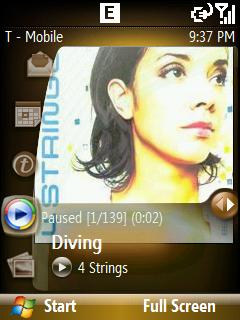
- Music - play and control Windows Media player. My personal favorite. Imagine seeing your album art in a big full screen image instead of in a tiny thumbnail ☺!
- My Photos - browse through the photos on your device through your homescreen.
- Settings - access commonly used settings/apps - such as Profiles, Task Manager, and Wireless Manager